

Welcome to another entry in Kinho’s Homelab Series! In the last entry, we set up our orchestration platform with K3s and solidified our network stack with Cilium. However, at this point we have built a whole Kubernetes cluster whose only job is to exist. It has no apps, no workloads, just vibes.
On top of that, Helm charts such as the one for Cilium were installed by hand, which means there’s no structure, no repeatability, and no easy way to rebuild. Before we can run real workloads, we need a proper, automated way to manage how all of our Kubernetes objects are installed and configured. It’s finally time to adopt the GitOps workflow!
In this entry, I’ll introduce Argo CD as our continuous delivery solution for our Kubernetes cluster. We’ll also take a look at one of the trickiest parts of a GitOps workflow: secret management strategies. Finally, we’ll install the Tailscale operator and deploy our first applications. Go ahead and grab a drink, this will be a fun one!
3. GitOps, Secrets, and First Application
What is Argo CD?

From the official Argo CD documentation , we get a very simple definition:
Argo CD is a declarative, GitOps continuous delivery tool for Kubernetes.
The key part here is in GitOps, so we must define what it is. From Gitlab’s post on GitOps :
GitOps is an operational framework that applies DevOps practices like version control, collaboration, and CI/CD to infrastructure automation, ensuring consistent, repeatable deployments. Teams put GitOps into practice by using Git repositories as the single source of truth, automating deployments, and enforcing changes through merge requests or pull requests. Any configuration drift, such as manual changes or errors, is overwritten by GitOps automation so the environment converges on the desired state defined in Git.
In other words, just like how we use version control for application code and merge changes that fix bugs or implement a feature, we can do the same with our Kubernetes infrastructure. In this case, every pull request represents a change to our infrastructure, and then a tool runs in a reconciliation loop to make sure the cluster state matches the desired state defined in Git.
The tool we’ll use to achieve our GitOps workflow for the homelab will indeed be Argo CD!
Installing Argo CD
Installing Argo is as simple as applying its CRDs with the following command:
kubectl create namespace argocd
kubectl apply -n argocd -f https://raw.githubusercontent.com/argoproj/argo-cd/stable/manifests/install.yamlWe need to grab the initial admin password so we can log in to the dashboard and change it.
kubectl get secret argocd-initial-admin-secret -n argocd -ojsonpath='{.data.password}' | base64 -dWe can now access the argocd-server. For now, let’s expose it locally via port-forward.
kubectl port-forward svc/argocd-server -n argocd 8080:443
Bootstrapping the Cluster
The Argo UI is very nice, however, using it to create applications and resources defeats the purpose of setting up a declarative GitOps workflow. We want to use Git as the single source of truth for the cluster. As such, we’ll use the app of apps pattern to easily manage the state of the cluster. Any changes to the cluster will be logically related to a commit. We let Argo sync the cluster using our repository to apply the necessary resources.
To bootstrap the cluster, we’ll apply an Application CRD from Argo to trigger all the other applications that will be installed.
 1apiVersion: argoproj.io/v1alpha1
 2kind: Application
 3metadata:
 4  name: bootstrap
 5  namespace: argocd
 6  annotations:
 7    argocd.argoproj.io/sync-wave: "-1" # system level priority on sync (https://argo-cd.readthedocs.io/en/stable/user-guide/sync-waves/)
 8spec:
 9  project: default
10  sources:
11    - repoURL: https://github.com/k1nho/homelab
12      targetRevision: main
13      path: argo
14  destination:
15    server: https://kubernetes.default.svc
16    namespace: argocd
17  syncPolicy:
18    automated:
19      prune: true
20 selfHeal: true- Line 11 defines the URL for the repository that we want Argo to sync from. In this case, it’s my own repository.
- Line 15 defines the destination where this app will be deployed; we use the
https://kubernetes.default.svcconvention to say that it will be the local cluster. - In the sync policy, we specify automatic pruning (delete resources if they are no longer defined in Git) and self-healing (revert any changes that cause drift from the cluster state defined in Git)
Strategy for Managing Secrets
Many of the applications we will run require secrets , however, as you might have already noticed we’re managing our cluster publicly and we don’t want to be another one in the list of the 39 million secrets leaked on Github 😅. That begs the question:
How can we introduce secrets into the cluster in an automated way without leaking them?
There are two popular choices to manage secrets within a GitOps workflow: either with a Secrets Operations Encryption (SOPS), or with an External Secret Operator (ESO).
SOPS and ESO
The SOPS approach encrypts secrets that you can push into the repository such that decryption happens only within the cluster. This avoids the common pitfall of plaintext leaked secrets. Some of the best choices for this approach are Sealed Secrets , and age . On the other hand, we have the ESO approach in which we pull secrets from an external manager like Azure Vault, AWS Secret Manager, or GCP Secret Manager via an operator and sync them into Kubernetes (either directly into the pod that needs it or within a Secret object). The main idea here is once again to avoid plaintext secrets and keep the repository secret-free. So which one should we choose?
Initially, I considered using Bitnami’s sealed secrets which is simple enough to set up; however, there are a few things that made me actually choose an ESO, namely secret rotation and API-based secret management. With sealed secrets, if we rotate the encryption keypair, we’d need to re-encrypt every one of the secrets. This isn’t too bad, but it becomes a bit manual. Moreover, having an API to create, fetch, and rotate secrets becomes incredibly important in CI/CD pipelines. While we have the usual suspects1 to choose from, I discovered Infisical , a powerful open source all-in-one secret management platform.
The Infisical ESO

Through this series, I like to consider these three pillars for choosing a particular software:
- The project is open source
- It has a generous free tier
- If one chooses to, it can be self-hosted!
Infisical meets this criteria, and when I consider that they have both a Kubernetes Operator and an SDK , it ends up fulfilling the other requirements: sync secrets into our cluster, and manage them with an API. Let’s define our Argo App to deploy the Infisical secrets operator.
 1apiVersion: argoproj.io/v1alpha1
 2kind: Application
 3metadata:
 4  name: infisical-secrets-operator
 5  namespace: argocd
 6  annotations:
 7    argocd.argoproj.io/sync-wave: "0" # cluster level priority on sync (https://argo-cd.readthedocs.io/en/stable/user-guide/sync-waves/)
 8spec:
 9  project: default
10  sources:
11    - repoURL: https://dl.cloudsmith.io/public/infisical/helm-charts/helm/charts/
12      chart: secrets-operator
13      targetRevision: 0.10.3
14      helm:
15        valueFiles:
16          - $values/cluster/infisical-operator/infisical-values.yaml
17    - repoURL: https://github.com/k1nho/homelab
18      targetRevision: main
19      ref: values
20  destination:
21    server: https://kubernetes.default.svc
22    namespace: infisical-secrets-operator
23  syncPolicy:
24    automated:
25      prune: true
26      selfHeal: true
27    syncOptions:
28 - CreateNamespace=trueThe spec is similar to how we defined the bootstrap application with some differences:
- Line 11 defines the repository URL where the Helm chart of the operator is hosted.
- Line 16 defines a path in our repository where our custom values for the operator’s Helm chart are defined.
- Line 28 sets the
CreateNamespacevariable to true so that it can create theinfisical-secrets-operatornamespace resource if it does not exist.
Let’s test the Infisical ESO in the next section where we’ll need an OAuth secret for our Tailscale operator.
Installing the Tailscale Operator
The tailscale kubernetes operator enables:
- Securing access to the Kubernetes control plane
- Exposing cluster workloads to the tailnet (Ingress)
- Exposing a tailnet service to the Kubernetes cluster (Egress)
There are many more possibilities as listed in the official documentation , but for this case we’re interested in exposing our cluster workloads to the tailnet, which means using it as ingress. I’ll also take a look at securing access to the control plane using an API server proxy to cover the remote case. As usual, we’ll configure our Tailscale operator as an ArgoCD app to deploy the Helm chart into the cluster with some custom values.
apiVersion: argoproj.io/v1alpha1
kind: Application
metadata:
  name: tailscale-operator
  namespace: argocd
  annotations:
    argocd.argoproj.io/sync-wave: "1" # app level priority on sync (https://argo-cd.readthedocs.io/en/stable/user-guide/sync-waves/)
spec:
  project: default
  sources:
    # Kustomize
    - repoURL: https://github.com/k1nho/homelab
      targetRevision: main
      path: apps/tailscale-operator

    - repoURL: https://pkgs.tailscale.com/helmcharts
      chart: tailscale-operator
      targetRevision: 1.90.9
      helm:
        valueFiles:
          - $values/apps/tailscale-operator/tailscale-operator-values.yaml

    - repoURL: https://github.com/k1nho/homelab
      targetRevision: main
      ref: values

  destination:
    server: https://kubernetes.default.svc
    namespace: tailscale-operator
  syncPolicy:
    automated:
      prune: true
      selfHeal: true
    syncOptions:
- CreateNamespace=trueAdding the OAuth Secret
Notice we define the path apps/tailscale-operator. This will pick up our kustomization.yaml definition, containing the Infisical Secret CRD operator-oauth-secret.yaml:
apiVersion: secrets.infisical.com/v1alpha1
kind: InfisicalSecret
metadata:
  name: operator-oauth
spec:
  authentication:
    universalAuth:
      secretsScope:
        projectSlug: homelab-d-s7-g

        envSlug: "prod"
        secretsPath: "/tailscale"
      credentialsRef:
        secretName: universal-auth-credentials
        secretNamespace: infisical-secrets-operator

  managedKubeSecretReferences:
    - secretName: operator-oauth
secretNamespace: tailscale-operatorConfiguring the Tailscale Operator as an API Server Proxy (Optional)
First, we need to configure access controls on Tailscale for the different groups.
{
  "grants": [
    {
      "src": ["autogroup:admin"], // change to the group/host that needs access
      "dst": ["tag:k8s-operator"],
      "app": {
        "tailscale.com/cap/kubernetes": [
          {
            "impersonate": {
              "groups": ["system:masters"] // select the appropriate group to impersonate
            }
          }
        ]
      }
    }
  ]
}Note
If you already have some ACLs set up, it might drop traffic. You can write a quick test to check that access to the tag:k8s-operator at TCP/443 is possible. For example:
{
  "tests": [
    {
      "src": "autogroup:admin",
      "accept": ["tag:k8s-operator:443"]
    }
  ]
}Install the helm chart
with these values.yaml:
apiServerProxyConfig:
  mode: "true" # "true", "false", "noauth"
allowImpersonation: "true" # "true", "false"Adding a Read-Only Cluster Role Binding
Lastly, we can create a cluster role binding to the view cluster role, which is read-only:
apiVersion: rbac.authorization.k8s.io/v1
kind: ClusterRoleBinding
metadata:
  name: tsreader
roleRef:
  apiGroup: rbac.authorization.k8s.io
  kind: ClusterRole
  name: view
subjects:
  - kind: Group
    name: tsreader
apiGroup: rbac.authorization.k8s.ioNow, if we try to get the clusterroles resource, after impersonation has been set to tsreader in the ACLS we get:
kubectl get clusterrolesError from server (Forbidden): clusterroles.rbac.authorization.k8s.io is forbidden:
User "[email protected]" cannot list resource "clusterroles" in API group "rbac.authorization.k8s.io" at the cluster scope
Very cool! For my little homelab this just solves remote access to the cluster, but this feature becomes incredibly powerful when working with teams that need to do proper access control of the Kubernetes resources for different users and groups.
First Applications
We are ready to deploy the first applications into our cluster. For the first app, we’re not going with anything crazy, but something simple enough to demonstrate that our cluster is running properly to deploy services. We’ll go for a classic stateless application , and what better one than this blog itself!
I made a full breakdown of the pipeline to build and publish this image using Dagger and Github actions that you can check here.
Exposing the Blog
All that’s left is to define our blog resources to be applied by Argo. In particular, we’ll use the Tailscale ingress class to expose the service to the tailnet with an FQDN that we can use to access it in our authorized devices.
apiVersion: networking.k8s.io/v1
kind: Ingress
metadata:
  name: kinho-blog-ingress
spec:
  defaultBackend:
    service:
      name: kinho-blog-svc
      port:
        number: 80
  ingressClassName: tailscale
  tls:
    - hosts:
- blogExposing the ArgoCD UI
Lastly, we’ll also get the Argo UI exposed. This service is already available from our original installation of Argo, so we can simply create the ingress resource for it.
apiVersion: networking.k8s.io/v1
kind: Ingress
metadata:
  name: argocd-ingress
spec:
  defaultBackend:
    service:
      name: argocd-server
      port:
        number: 443
  ingressClassName: tailscale
  tls:
    - hosts:
- argoNow, if we check our ingresses:
kubectl get ingress -ANAMESPACE NAME CLASS HOSTS ADDRESS PORTS AGE
kinho-blog kinho-blog-ingress tailscale * blog.manakin-koi.ts.net 80, 443 1d
argocd argocd-ingress tailscale * argo.manakin-koi.ts.net 80, 443 1d
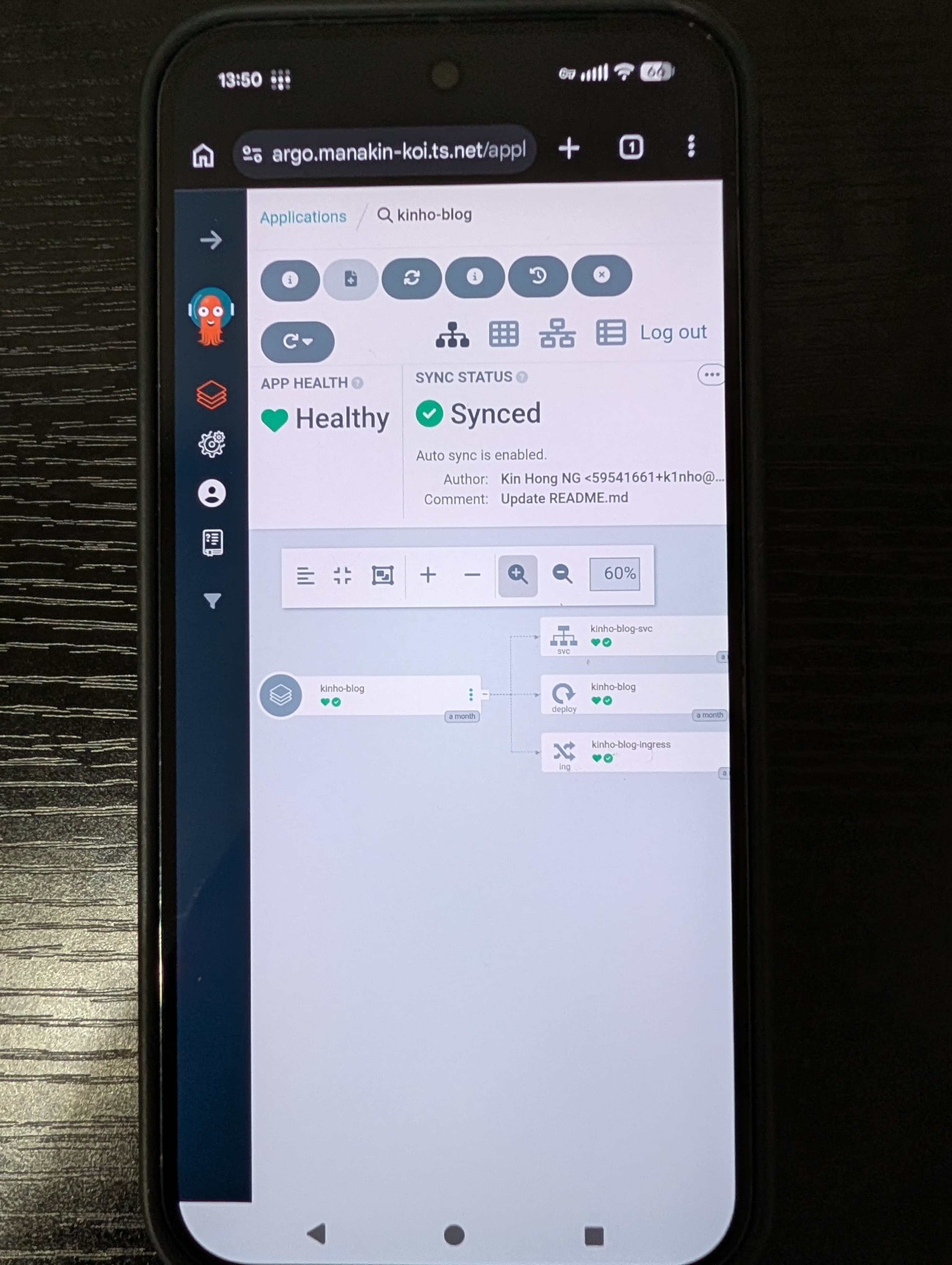
Since we’re using Tailscale as the ingressClassName, we can access it on any of our authorized devices described in our ACL. Here I am accessing the
Argo UI on my phone, very cool!
Wrapping up
That’s it for this entry! I started by looking into the implementation of the GitOps workflow, which led me to the introduction of ArgoCD. From there, I:
- Adopted Argo’s app of apps pattern
- Set up Infisical as our external secret operator for handling secrets in the cluster
- Installed the Tailscale operator to provision ingress and remote access
- Ran the first applications of the cluster: the blog and Argo UI
- Used the GitOps workflow throughout all the installations!
The cluster is now alive with the blog running! But there are many more improvements needed. First, we’ve deployed multiple applications, but we need to effectively monitor the resource consumption of our services. Moreover, we haven’t had the need for a database to persistently store information. When the time comes (and it will come), a solution for provisioning storage, backup, and a disaster recovery strategy becomes important to keep data safe. In the next entry, we’ll explore a few of these!